::: 까만콩 빈이네 :::
까만콩 빈이네의 살아가는 이야기를 기록합니다
RSS
  • Home

11월 15 2010

Free Notification Plugin for Mail.app

http://erikhinterbichler.com/software/herald/ 

메일이 오면 알려주는 메일 플러긴입니다. 메일을 자주 사용하시는 분에게는 유용할 듯…


Features

  • Quick Action Toolbar. Easily perform actions on messages: mark as read, view in Mail, initiate replies, or delete right from within the notification window.
  • Customizable Appearance. Adjust window size, position, color, shadow, and transparency.
  • Enable Specific Mailboxes. Enable notifications for all mailboxes or only specific mailboxes of your choosing.
  • Message Grouping. Messages are grouped into a single notification window to prevent clutter. Flip through messages with a single click.
  • View Full Message. A scrollable message window means you can view your full message without having to switch to Mail.
  • Automatic or Manual Dismissal. Configure Herald to dismiss notifications after a set period of time or stay on screen until the window is clicked.
  • Snow Leopard Compatible. Fully compatible with the latest version of Mac OS X.

By vinipapa • 무른모, 정 보 • 0 • Tags: free, Mail, Plugin, POP

11월 15 2010

Itsy – Simple Twitter Client for Mac

http://www.macupdate.com/info.php/id/33399/itsy
 

DESCRIPTION
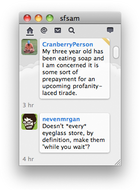
Itsy is a small, simple Twitter app for your Mac.

Itsy won't hog up your screen or do other crazy things.

  • See and send tweets, replies, DM's
  • Mentions integrated into timeline
  • Inline yfrog and twitpic viewing
  • Reply chains
  • Growl notifications
  • Twitter Search
WHAT'S NEW
Version 2.0.2:

  • Preference option to hide inline images.
  • Inline images link to web originals.
  • Full resolution TwitPics inline instead of cropped thumbnails.
  • Timeline retains focus after a refresh to allow keyboard arrow navigation.
  • Many internal changes to prepare for a major change in the way Twitter sends data to clients. This change is scheduled to occur on November 26, 2010.
  • Minor bug fixes.

By vinipapa • 무른모, 정 보 • 0 • Tags: Client, free, Twitter, 트위터

11월 15 2010

iBook G4(PPC)와 iPhone 3Gs 테터링

맥북에서는 iPhone을 통해서 테터링이 자동으로 이상하게 iBook G4 1.25Ghz PPC Mac OS X 10.5.8에서는 자동으로 잡히지를 않아서 기록으로 남겨둡니다. 원래는 이더넷 포트가 자동으로 설정된다고 여러 사이트에서 설명하고 있는데 그렇게 되지를 않아서 시행착오를 거쳐서 만든 팁?입니다.


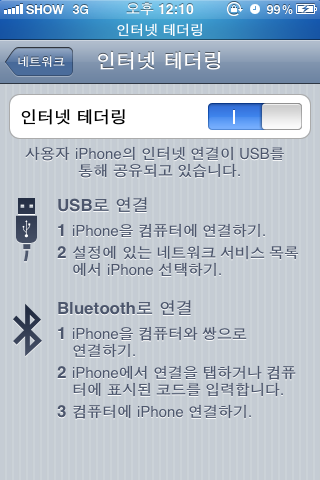
iPhone을 USB에 꽂고 iPhone설정에서 테터링을 'ON'하고 블루투스가 없으므로 'USB전용'으로 선택, 시스템 설정에서 네트워크를 누르고 아래에 보면 도와주세요!를 눌러서 자동설정을 클릭하고 모뎀이나 Airport가 아닌 기타를 선택해서 확인을 누르면 옆에 en2라는 이더넷 포트가 잡힙니다.


테터링을 성공하고 나면 위가 파란색으로 바뀌고 대기중이면 오른쪽과 같이 나타납니다. 별로 어려운 것이 아니므로 기록을 위해 남겨둡니다.

By vinipapa • 굳은모, 무른모, 정 보 • 0 • Tags: iBook, iPhone, Tip, 네트웍, 설정, 테터링

«< 97 98 99 100 101 >»

카테고리

  • 매킨토시 (261)
    • 굳은모 (73)
    • 무른모 (194)
  • 빈이네 (305)
    • 가족들 (109)
    • 까만콩 (60)
    • 엄마아빠 (131)
  • 잡동사니 (175)
    • 수다떨기 (37)
    • 정 보 (127)
    • 책읽기 (11)

그 밖의 기능

  • 로그인
  • 글 RSS
  • 댓글 RSS
  • WordPress.org

태그

AirPlay AirPrint Apple BootCamp bundle Database Design Dock Dropbox Edit Event Excel free iPad iPhone iTunes Limitted Free Mac Macbook Mac Bundle MacJournal Mac OSX Macupdate MobileMe OCR Pebble safari Sale share Snow Leopard software Tip tweet Twitter Update Windows 구입 나들이 맥 무료 빈이 업데이트 엑셀 엑셀(EXCEL) 팁
  • 2026 새로운 봄
  • 29년 11개월 회사를 그만 두면서…
  • 2024 윤석열 탄핵 집회 참석
  • 맥 마이그레이션 중…
  • 동백

↑

© ::: 까만콩 빈이네 ::: 2026
Powered by WordPress • Themify WordPress Themes